PixInsight script
Drizzle Advisor
Checks from pixel scale and FWHM (SubframeSelector) whether 2x drizzle is worthwhile for an object/filter and gives the DrizzleIntegration values.
- Version 0.9.2 · 2026-11-21
- Menu in PixInsight Script > AoP Astro Suite > Drizzle Advisor
- PixInsight 1.8.9 or newer (assumed)
- Required processes SubframeSelector, DrizzleIntegration
- Price free, no warranty
The minimum version 1.8.9 is an assumption and has not been tested. I work with PixInsight 1.9.6. I cannot judge older versions.
Download ZIP (121 KB) Manual as PDF (2.1 MB)
Installation
Option 1: via the repository (recommended)
Set it up once and get updates directly inside PixInsight.
In PixInsight open Resources › Updates › Manage Repositories.
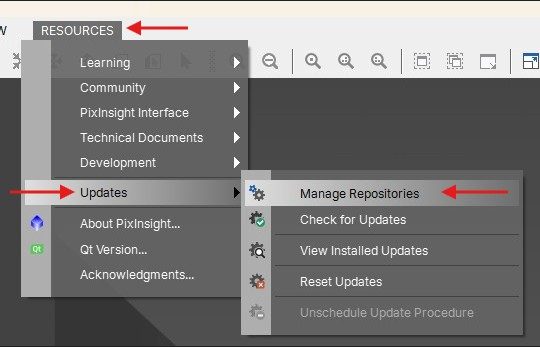
PixInsight: Resources > Updates > Manage Repositories. Copy the repository address (with the trailing slash):
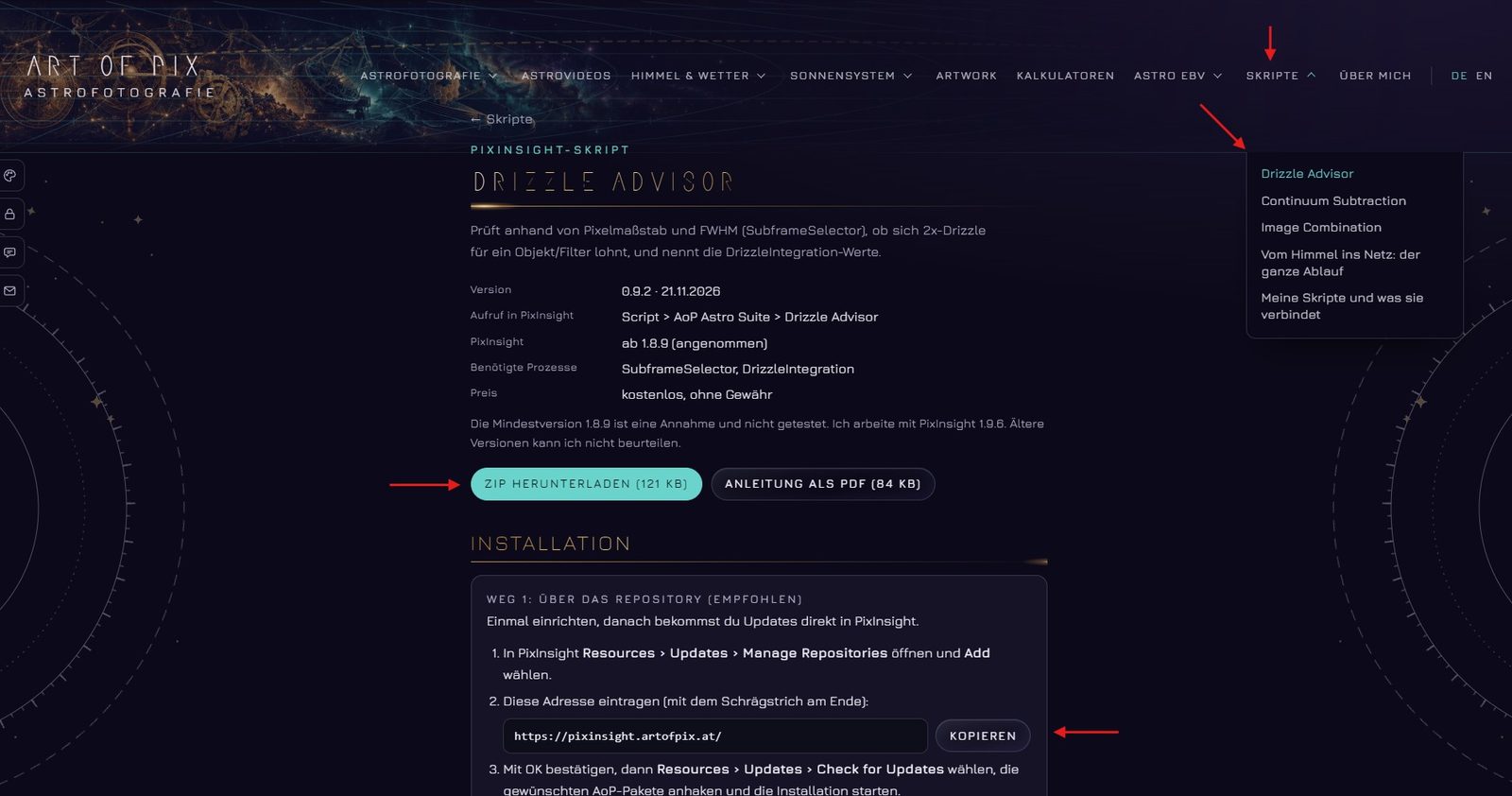
Copy the repository address from this page with “Copy”. In the window click Add, paste the address and confirm with OK.
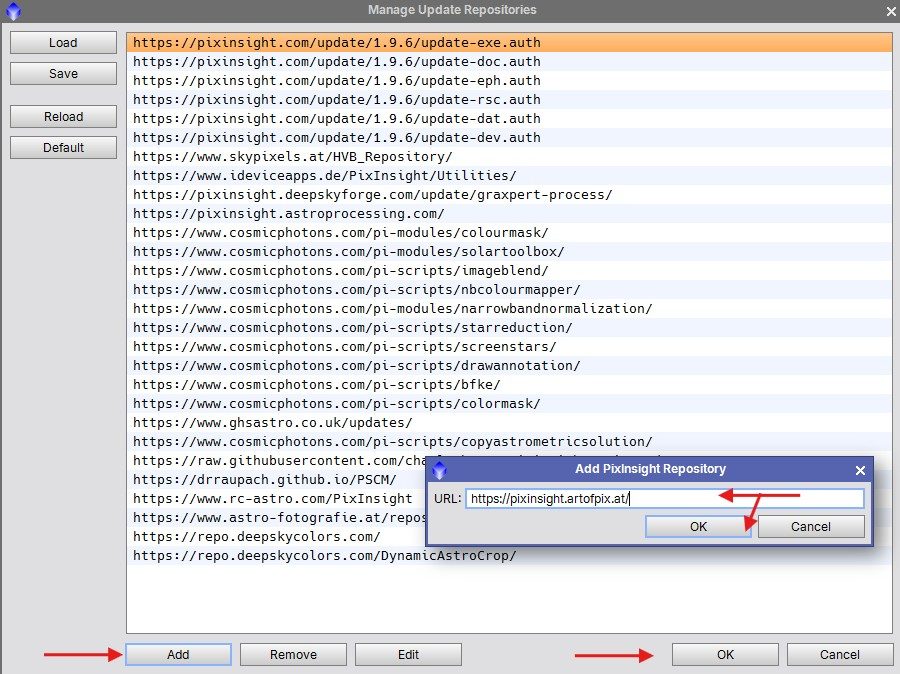
Choose Add, paste the address and confirm with OK. The new entry is at the end of the list. Close the window with OK.
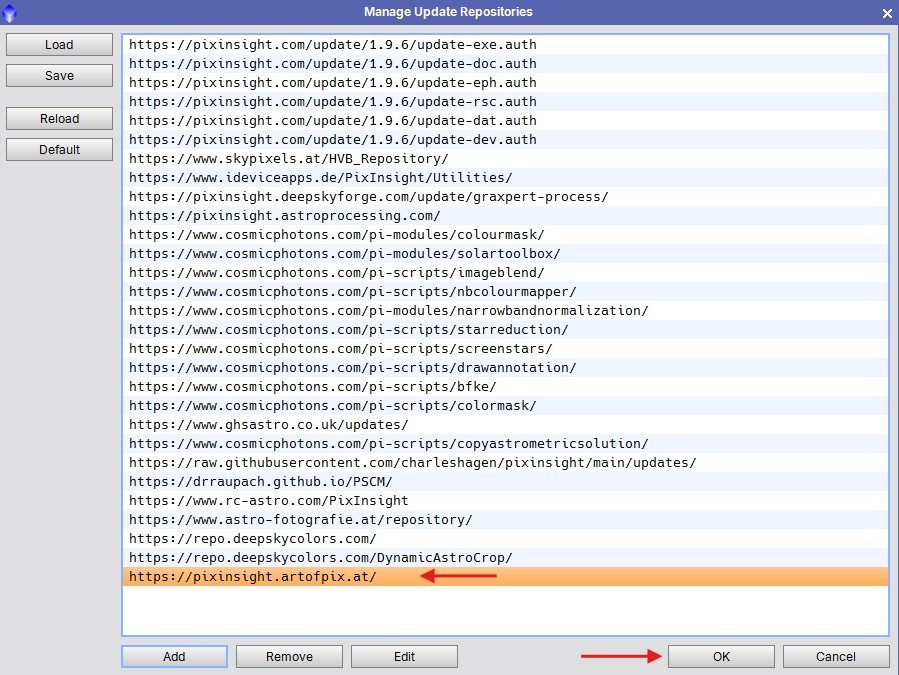
The new entry is at the end of the list. Close with OK. Then choose Resources › Updates › Check for Updates. PixInsight downloads the repository information; the warning that the repository is unsigned is expected (see below).
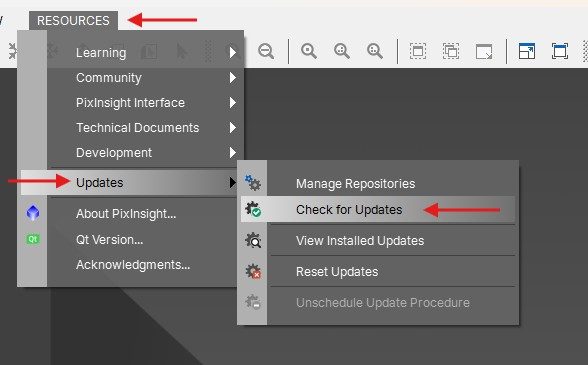
Resources > Updates > Check for Updates. 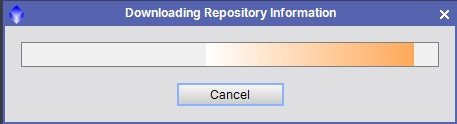
PixInsight downloads the repository information. Then tick the AoP packages you want and install them. Tick the AoP packages you want and start the installation. Then quit PixInsight with File › Quit PixInsight: updates are applied only when it quits.
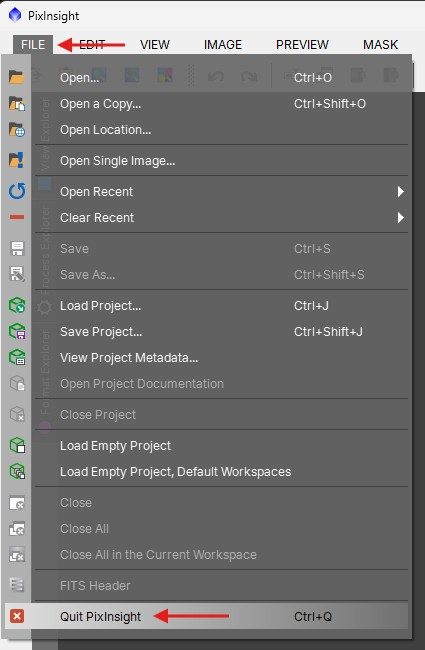
Updates take effect only after a restart: File > Quit PixInsight, then start it again. Start PixInsight again. The script is now under Script > AoP Astro Suite > Drizzle Advisor. If the entry is missing, run Script › Feature Scripts › Regenerate once.
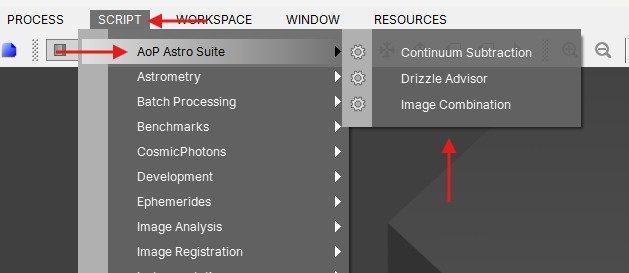
After the update: Script > AoP Astro Suite lists the installed scripts.
PixInsight warns that the repository is unsigned. That is expected: I do not (yet) have a signature from the PixInsight developers. PixInsight additionally verifies every package with a checksum. Do not also add the same script from another folder via “Feature Scripts › Add”, or the menu entry will appear twice.
Option 2: ZIP file by hand
Download the ZIP and unpack it to a permanent location (not the Downloads folder: the script is loaded from there at every start).
In PixInsight open Script › Feature Scripts….
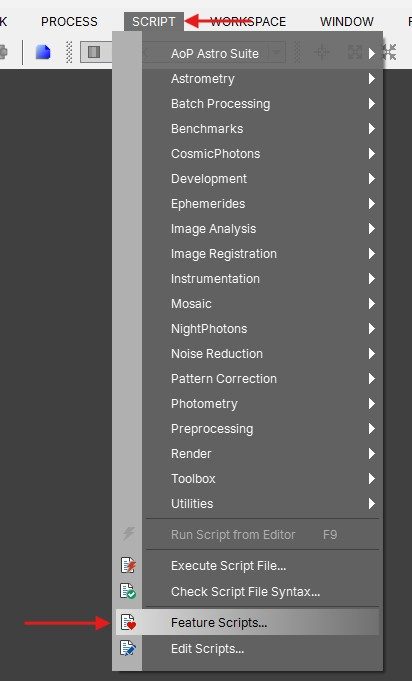
Without the repository: open Script > Feature Scripts… In the window choose Add and select the unpacked folder with the .js file, then Regenerate and Done.
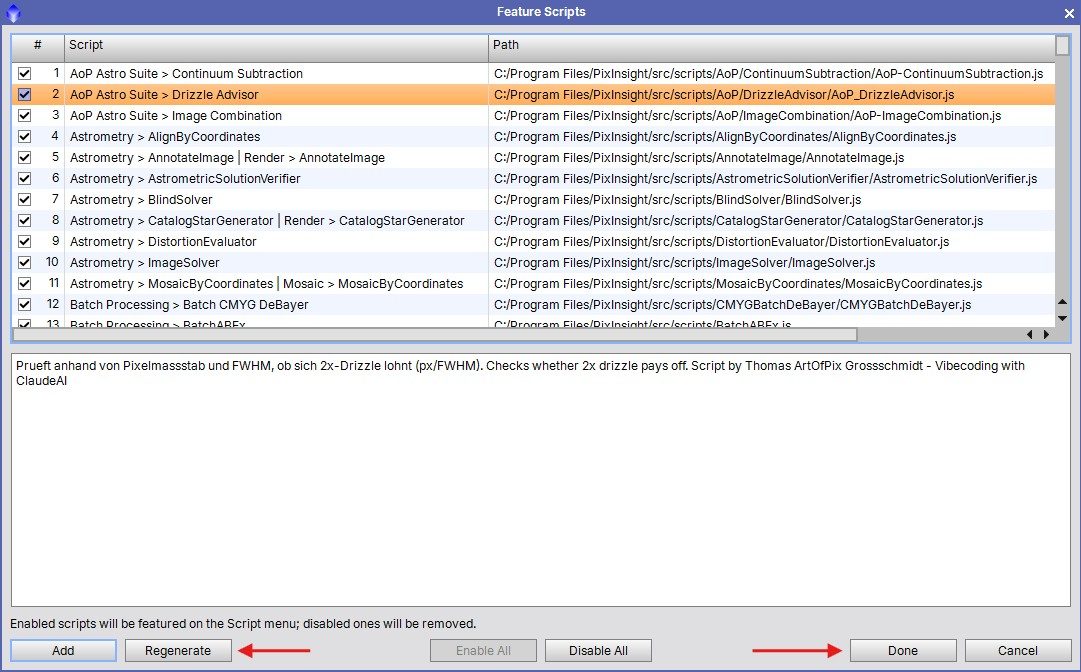
Feature Scripts: Add (choose the folder with the script), then Regenerate and Done. Start it via Script > AoP Astro Suite > Drizzle Advisor.
After the update: Script > AoP Astro Suite lists the installed scripts.
Update
- Repository: Resources › Updates › Check for Updates, tick the package, install, and restart PixInsight. The update does not take effect without a restart.
- ZIP: Unpack the new ZIP into the same folder and overwrite the old file, then run Script › Feature Scripts › Regenerate. Desktop icons belong to one specific file version and have to be created again afterwards.
Videos
The videos are hosted on YouTube. Only when you click “Load video” a connection to YouTube (youtube-nocookie.com) is made and data is sent there.
Manual
The manual is on this page and as a PDF (German and English in one file). Download PDF
1. What the script is for
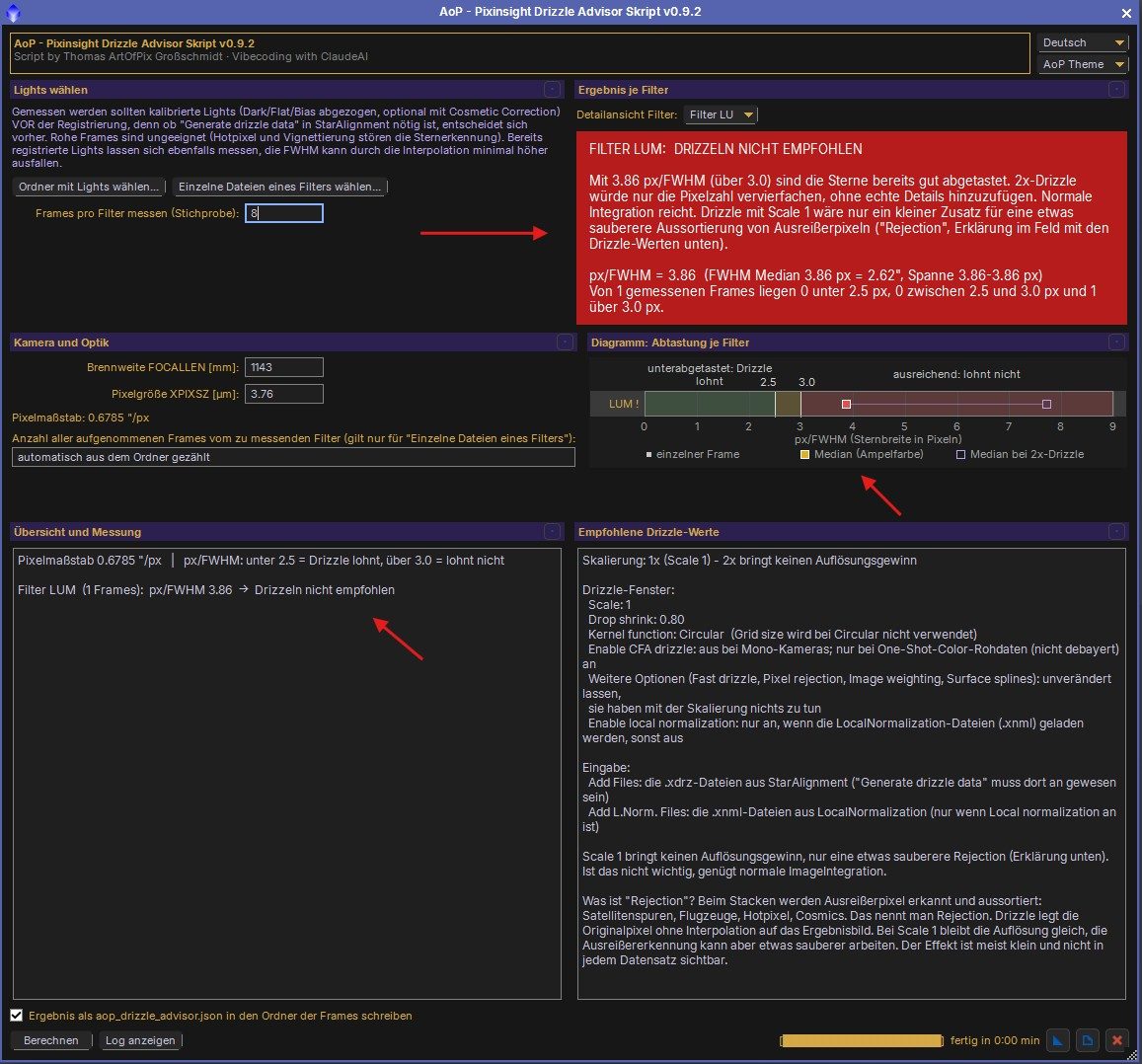
The script answers one question: is 2x drizzle worthwhile for this data? It measures the star width (FWHM) of a sample of your calibrated light frames with PixInsight's SubframeSelector, compares it with the pixel scale, and shows per filter a traffic light, a plain-language verdict, and the values to enter in the DrizzleIntegration window.
It only measures. It does not change any image and does not start StarAlignment or DrizzleIntegration.
2. Requirements
- PixInsight with the processes SubframeSelector and (for the result) DrizzleIntegration. Which PixInsight versions the script runs on has not been verified; it is developed and used on the author's installation.
- Calibrated lights (darks/flats/bias subtracted, optionally with Cosmetic Correction), measured before registration. Raw frames are unsuitable: hot pixels and vignetting disturb star detection. Already registered lights can be measured as well; the FWHM may come out slightly higher because of the interpolation.
- FITS or XISF files (
.xisf,.fit,.fits,.fts) with the header keywordsFOCALLEN(focal length, mm) andXPIXSZ(pixel size, µm). If they are missing, enter the values by hand.
3. Installation
- Put the folder with
AoP_DrizzleAdvisor.jsat a permanent location (any folder you like; the script needs no particular path). - In PixInsight: Script > Feature Scripts > Add, choose that folder, then Done. Alternatively run it once via Script > Execute Script File.
- Start it from Script > AoP Astro Suite > Drizzle Advisor.
- After an update, or if the menu entry is missing or looks outdated: Script > Feature Scripts > Regenerate (or restart PixInsight).
- A desktop icon (drag the triangle at the bottom left of the dialog onto the PixInsight desktop) belongs to exactly this file version. Create it again after an update.
4. Operation
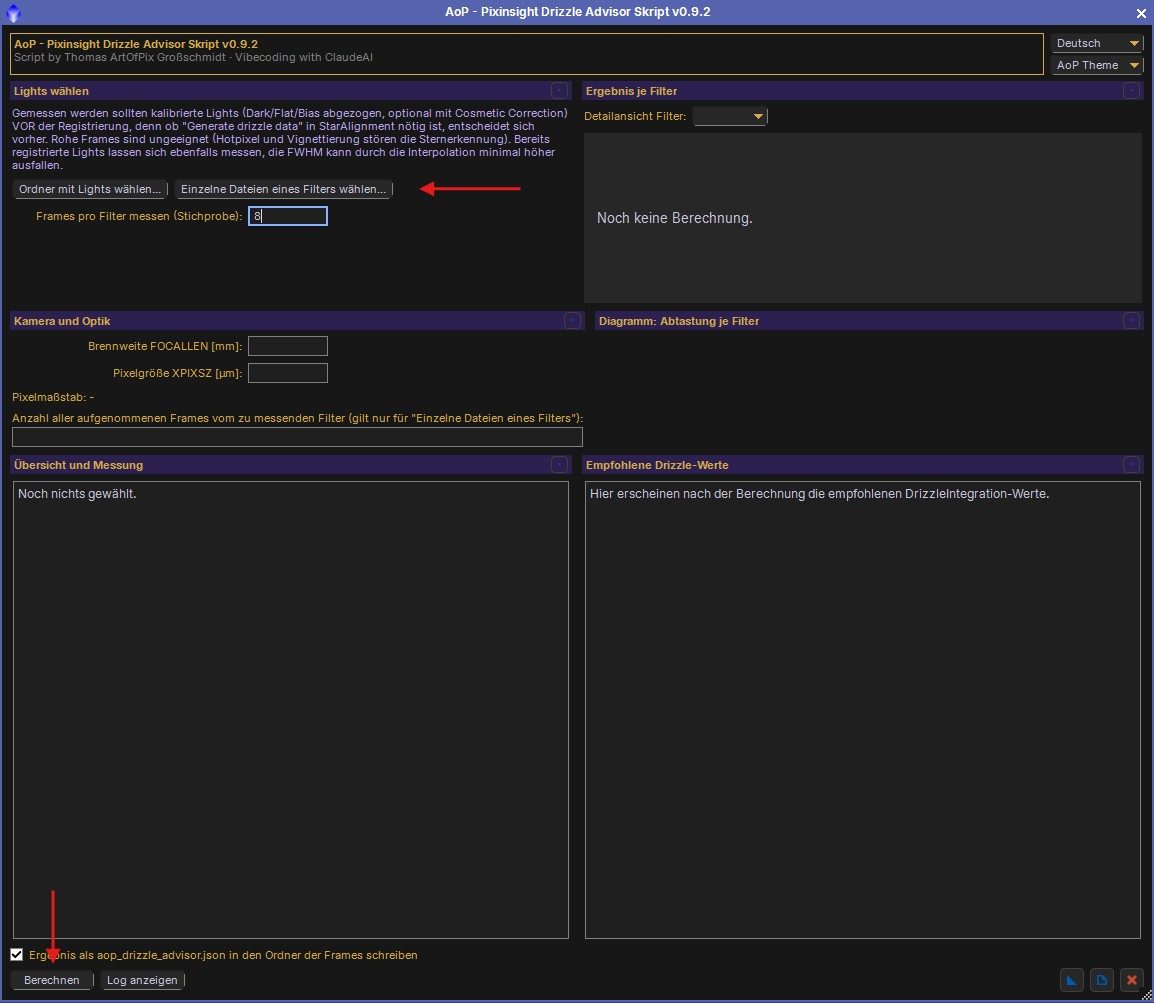
Language: Choose Deutsch or English at the top right of the dialog. The dialog closes briefly and reopens in the same place; folder, entries and results already calculated are kept, and the verdict is rewritten in the new language. The choice is remembered in the PixInsight settings.
Color theme: Next to it choose AoP Theme (dark, dark-violet title bars, like the other AoP scripts) or PI Theme (standard PixInsight look). The dialog is rebuilt here too; the choice is remembered. In the AoP theme, buttons and combo boxes take no keyboard focus.
Sections, tooltips, help: The sections ("Select lights", "Camera and optics", "Overview and measurement", "Result per filter", "Recommended drizzle values") collapse and expand when you click the title bar. Every field has a tooltip (What / Why / Example). At the bottom are the triangle (new instance), the help icon and "Close". Enter does not start a measurement; measuring only starts when you click "Calculate".
Chart "Sampling per filter": px/FWHM (star width in pixels) is on the horizontal axis, the quantity the traffic light is based on. The zones are the limits 2.5 (below: drizzle worthwhile) and 3.0 (above: not worthwhile). One row per filter: the dots are the single measured frames, the square in traffic-light color is the median, the hollow square shows where the median would lie with 2x drizzle (output pixels are then half as large, so stars are twice as many pixels wide). An exclamation mark after a filter name means: fewer than 15 frames. Clicking a row selects that filter in the detail view.
Log: The button "Show log" opens the log of this session (selectable and copyable; "Copy all"). It is also written as a file AoP_DrizzleAdvisor_<date>_<time>.log, by default in the folder AoP-DrizzleAdvisor-logs in the user directory; the folder can be changed in the log window (applies from the next start), the last 10 files are kept. In case of an error message, copy the log and pass it on.
Step by step
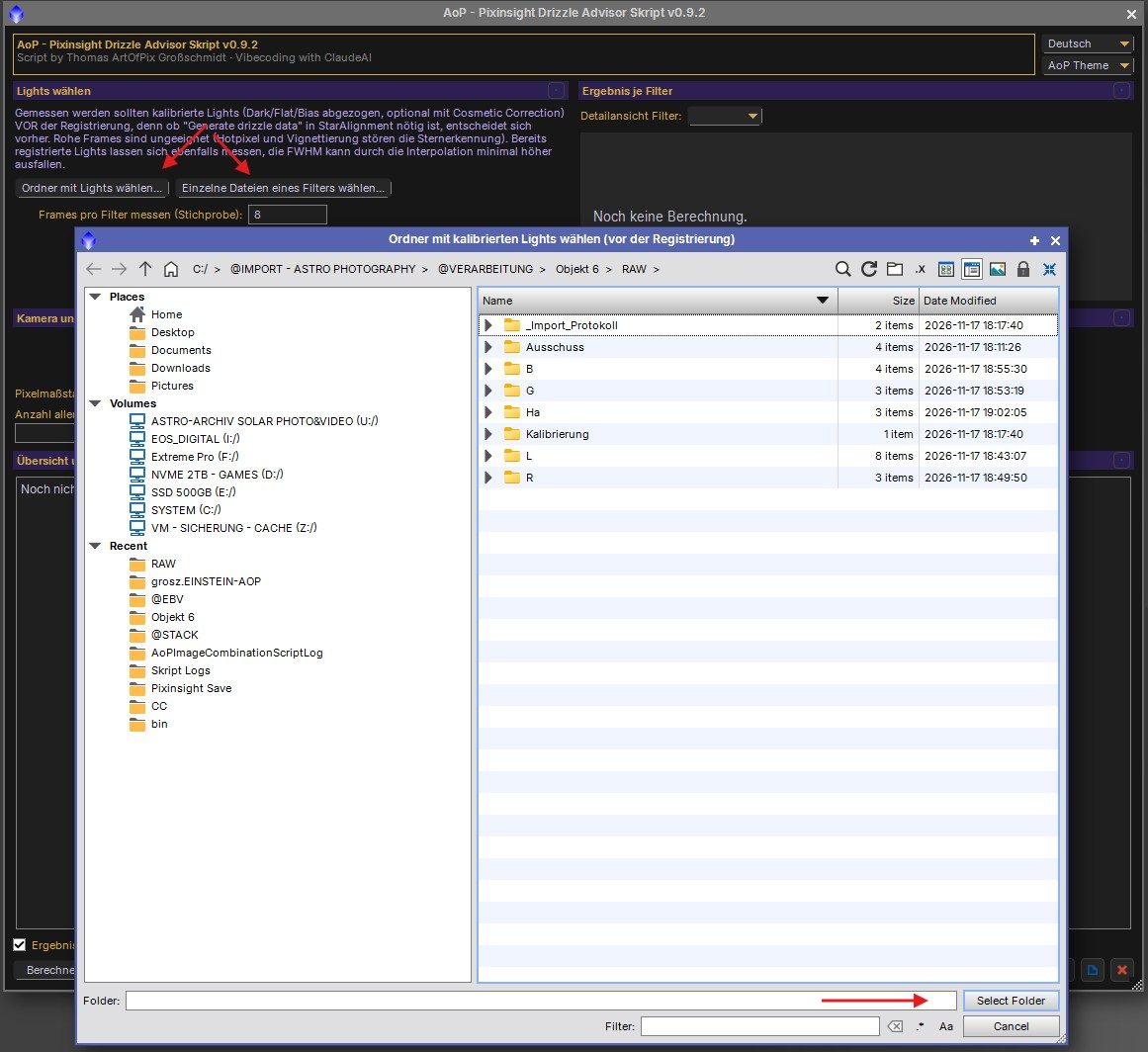
- Select folder with lights... All filters may be mixed in the folder. The script counts the lights per filter itself (only files with "LIGHT" in the name; if there are none, it asks whether all image files should count as lights) and shows in the text field how many frames per filter will be measured.
- The filter is taken from the file name (
..._LIGHT_<Filter>_...), otherwise from theFILTERheader. - Frames to measure per filter (sample): default 8. The frames are chosen evenly spread over all nights. More = more accurate, but slower.
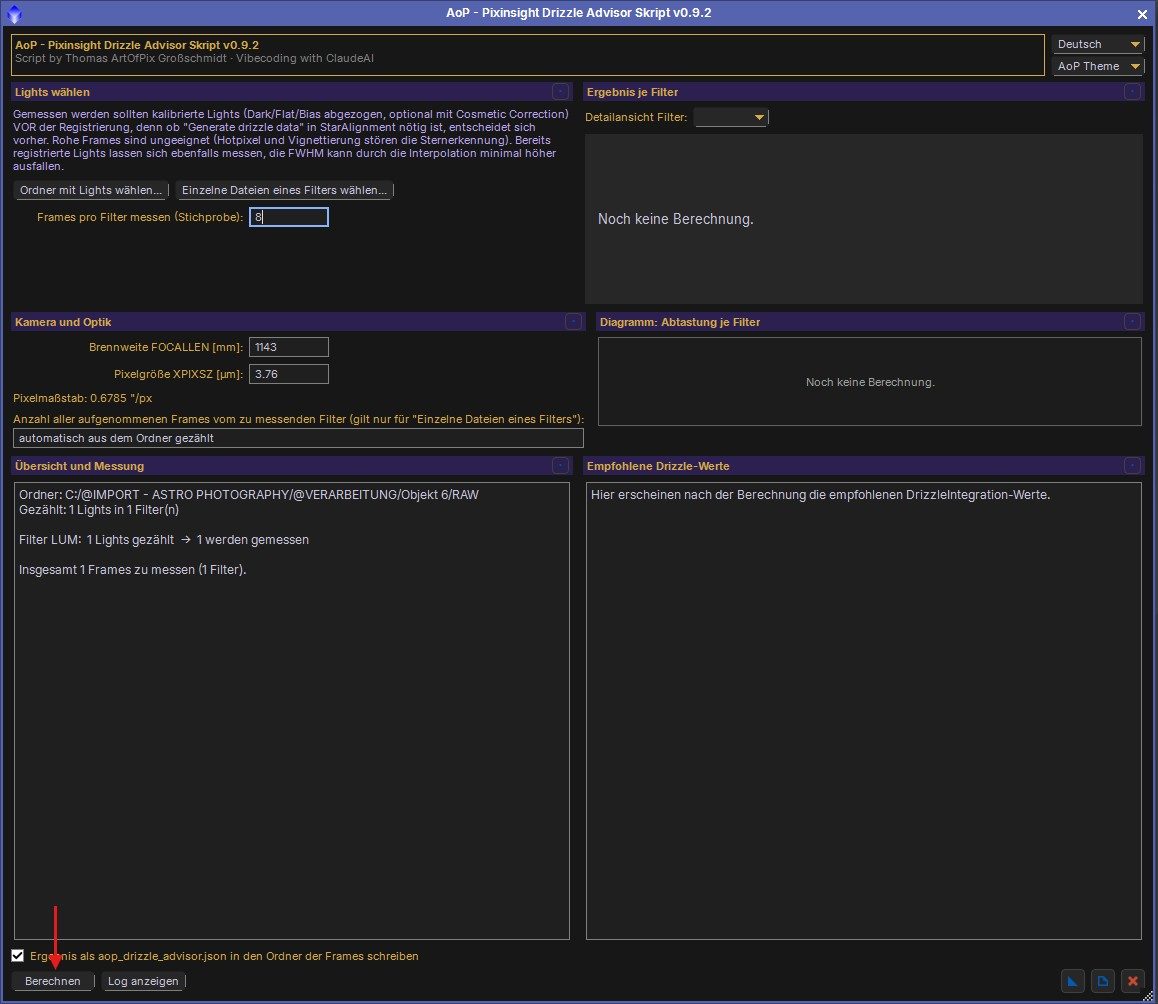
- Focal length FOCALLEN [mm] and pixel size XPIXSZ [µm] are read from the header of the first file. Correct them if needed. With binning, check whether the pixel size value already includes the binned size. Below them the calculated pixel scale in "/px is shown.
- Calculate. The sample is measured per filter. A text bar shows the filter, elapsed time and estimated remaining time. Progress per frame is technically not possible because the SubframeSelector measures the list in one block. Details appear in the PixInsight console.
- Read the result: the table summarizes all filters. With Detail view filter you choose one filter: traffic light, plain-language verdict, distribution of the single measurements, outliers, and below that the recommended DrizzleIntegration values.
- Optional (checkbox at the bottom): Write the result as aop_drizzle_advisor.json into the frames folder.
5. How the verdict is made
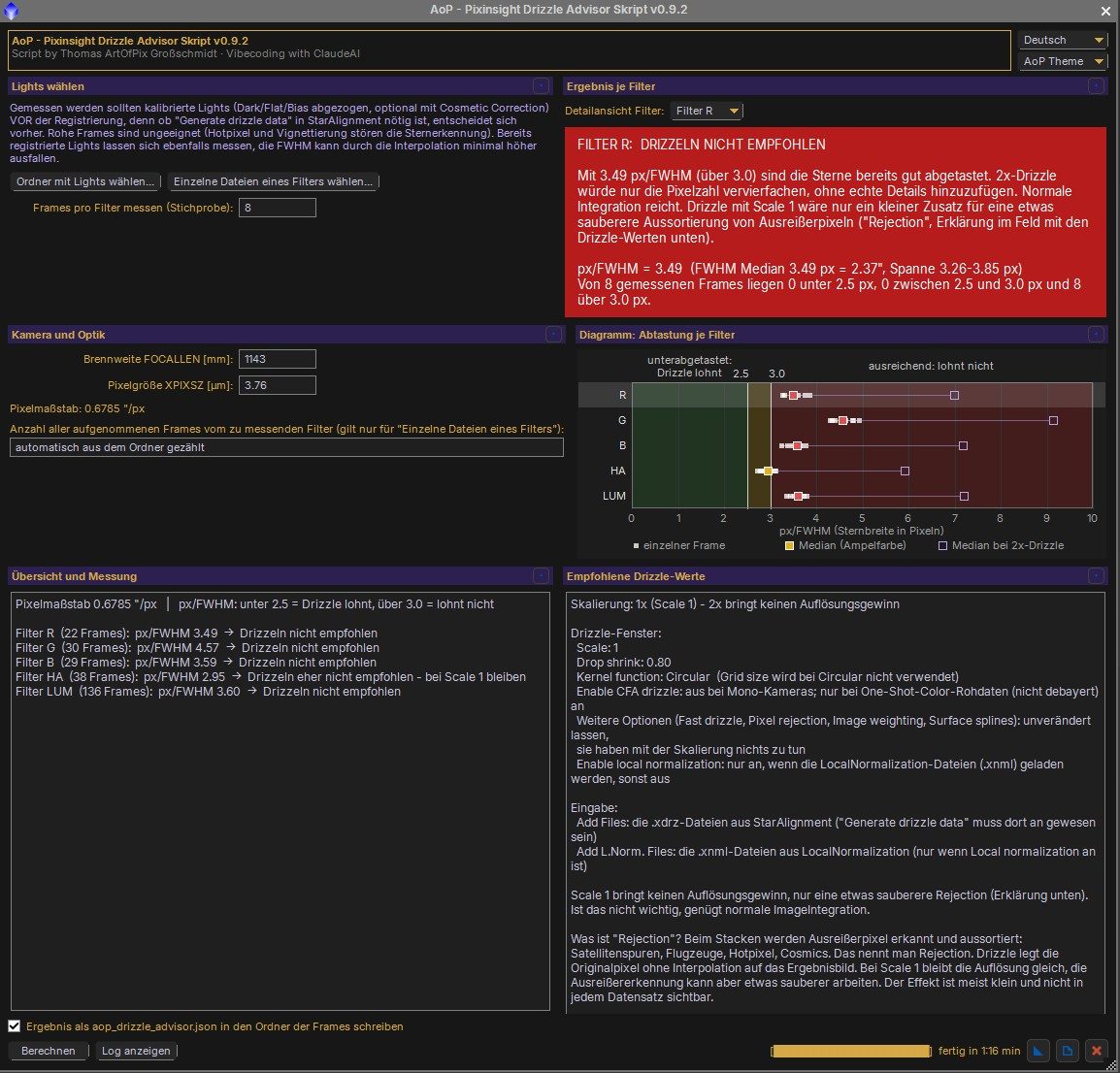
px/FWHM = FWHM of the sample median, in pixels.
| px/FWHM | Light | Meaning |
|---|---|---|
| below 2.5 | green | image is undersampled, 2x drizzle recovers detail |
| 2.5 to 3.0 | yellow | borderline: test first (compare Scale 1 with Scale 2) |
| above 3.0 | red | adequately sampled, 2x gives no gain |
Additional condition: about 15 well-dithered frames per filter. With fewer, grid artifacts are likely; then Scale 1 is recommended even for green.
The limits 2.5 and 3.0 are practical rules of thumb. The split of the yellow range at 2.75 ("possible, test first" below, "rather not recommended" above) is this script's own choice. Frames whose FWHM is above 1.5 times the median are listed as outliers.
Pixel scale ["/px] = 206.265 × pixel size [µm] ÷ focal length [mm].
6. The recommended drizzle values
For the DrizzleIntegration window the script gives: Scale (1 or 2), Drop shrink 0.80, Kernel function Circular, CFA drizzle only for non-debayered one-shot-color data, and which files to add (.xdrz from StarAlignment with "Generate drizzle data", optionally .xnml from LocalNormalization). All other options stay unchanged. At Scale 1 the script also explains the term rejection (discarding outlier pixels such as satellite trails, hot pixels, cosmic rays).
Important: "Generate drizzle data" must have been on in StarAlignment, otherwise there are no .xdrz files. That is why the script measures before registration.
7. The JSON file
With the checkbox set, the script writes aop_drizzle_advisor.json into the folder of the frames (for individual files: into their folder). The texts in it are always German, independent of the dialog language, because other scripts of the AoP suite read them; the field text_language names the language.
| Field | Content |
|---|---|
tool, version, text_language | script, version, language of the text fields (de) |
mode | folder or files |
source | folder of the measured frames |
focallen_mm, xpixsz_um, pixel_scale_arcsec_px | inputs and calculated pixel scale |
filters[] | per filter: filter, frames_total, frames_measured, fwhm_median_px, fwhm_median_arcsec, fwhm_min_px, fwhm_max_px, px_per_fwhm, level (green/yellow/red), gate_frames_ok, recommendation, recommendation_text, drizzle_scale_recommended, drizzle_settings, measurements[] (file, fwhm_px, eccentricity, stars) |
8. Limits and known quirks
- The FWHM value comes from column 5 of the SubframeSelector measurement table (FWHM in pixels, independent of the subframe scale). This mapping was determined by a test run, not confirmed by documentation.
- After every measurement PixInsight reports an error during cleanup (access violation in the SubframeSelector).
executeGlobalthen returns "false" although the results are present. The script uses them anyway and writes a warning to the console. - The statement that Scale 1 gives "somewhat cleaner rejection" is general experience and not visible in every data set.
- The English texts have not been reviewed by a native speaker.
- So far the script has only been tested outside PixInsight with a mock (logic, language and theme switch, dialog construction, chart drawing calls, log, JSON). A run inside PixInsight itself is not yet confirmed for this version.
9. Change log
- v0.9.2 (21 Nov 2026) Dialog in three rows with two equally tall sections each; progress bar at the bottom right before the triangle. No change to logic, verdict, JSON and menu entry.
- v0.9.1 (21 Nov 2026) Dialog in two columns (wider, less tall). No change to logic, verdict, JSON and menu entry.
- v0.9.0 (21 Nov 2026) "Show log" button with log window and log file, chart "Sampling per filter". No change to measurement, verdict, JSON and menu entry.
- v0.8.0 (21 Nov 2026) AoP Theme / PI Theme choice (remembered), violet title bars, collapsible sections, header with name, version and credit, buttons without keyboard focus, tooltips What/Why/Example, help window, toolbar. No change to measurement, verdict, JSON and menu entry.
- v0.7.1 (21 Nov 2026) Script name in header and window title changed to the full name. Release folder with
release.jsonand this manual. No change to logic, texts or JSON. - v0.7.0 (21 Nov 2026) Language switch German / English (all texts, help, verdicts, console; the choice is remembered, results are kept when switching). Credit line in the dialog. JSON texts stay German (field
text_language). - v0.6.3 (4 Nov 2026) Menu entry under "AoP Astro Suite > Drizzle Advisor";
#feature-infopure ASCII. - v0.6.2 (13 Oct 2026) Plain-language texts, new-instance triangle for desktop icons.
- v0.6.0 (13 Oct 2026) Folder mode: mixed filters, sample per filter, text bar with remaining time, verdict and drizzle values per filter.
- v0.1 to v0.5 (13 Oct 2026) First version with individual files, FWHM unit fix (pixels instead of arcseconds), plain-language verdict, recommended DrizzleIntegration values.
10. Author and license
Script by Thomas ArtOfPix Großschmidt · Vibecoding with ClaudeAI.
License (AoP Freeware License): The script is free to use. It is provided without warranty and without liability; the author is not liable for any damage or data loss. Redistribution only unmodified and with attribution (the line "Script by Thomas ArtOfPix Großschmidt · Vibecoding with ClaudeAI" must be kept). All other rights remain with the author. This is not an open-source license.
Licence and liability
Free to use, without warranty and without liability: I accept no liability for damage or data loss. Redistribution only unmodified and with attribution (Script by Thomas ArtOfPix Großschmidt · Vibecoding with ClaudeAI). All other rights remain with me. This is not an open-source licence. For bugs or wishes please write to me via the contact page.
Checksum (SHA-256) of the ZIP file: 4df5f5159b7fefb6579f2466fc342a395cc8eae69e332c5c6086ac6a82fb1179